Put your app online with any agent
For Codex, Cursor, Claude Code without the plugin, or any agent that can run commands on your computer. You download a small zip from Purgatory; the agent uses it to build and run your app in your sandbox, and gives you its link.
What you need: the agent, Docker installed on your computer, and a Purgatory account with a sandbox (+ New sandbox in Purgatory; see step 1 of the Claude Code tutorial).
1. Download the zip
In Purgatory, click your sandbox, then Let your agent deploy… → Download; in the Advanced view the same window also has Options (the token's name and expiry, a zip without the Docker keys, Copy as .env). You get p7y-<sandbox>.zip.
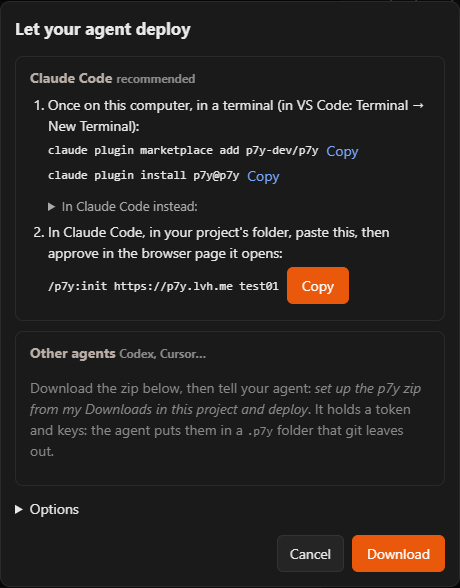
It holds a token for this sandbox and its keys: treat it like a password. Do not email it or commit it.
2. Hand it to the agent
Open your app's folder with the agent and say:
Set up the p7y zip from my Downloads in this project and deploy.
The agent unpacks it into a .p7y folder in your project, deletes the zip, builds your app in the sandbox, starts it and gives you its link. The .p7y folder keeps itself out of git on its own (it has its own .gitignore); leave it there, the agent uses it for every later update.
If the agent does not know what to do, point it to the instructions inside: read .p7y/README.md and deploy this app to my sandbox.
3. Update
Changed something? Update the app in my sandbox. The same link shows the new version.
Good to know
- The zip's token expires in 90 days (in the Advanced view you can choose 30 days or never). Download a new zip then.
- Lost the zip, or someone else got it? In Purgatory (Advanced view): the sandbox → Access → Rotate Docker keys… makes the old keys useless, and Access tokens lets you revoke its token.
- Sleep and wake work the same as with Claude Code: see Good to know there.
For agent builders: everything the agent does is in the agent guide.